> For the complete documentation index, see [llms.txt](https://help.everask.ai/llms.txt). Markdown versions of documentation pages are available by appending `.md` to page URLs; this page is available as [Markdown](https://help.everask.ai/products-and-features/everask-mobile.md).
# EverAsk Mobile
Chatly goes wherever you do. Use the standalone Chatly app on iOS or Android to chat, create, and get answers without opening a browser.
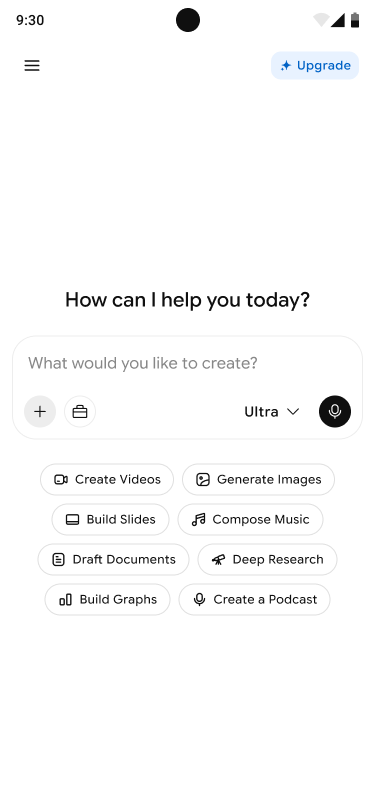
Open the app and just ask. Type your request, or tap a quick option like Create Videos, Generate Images, Build Slides, Compose Music, Draft Documents, Deep Research, Build Graphs, to jump straight in.
\
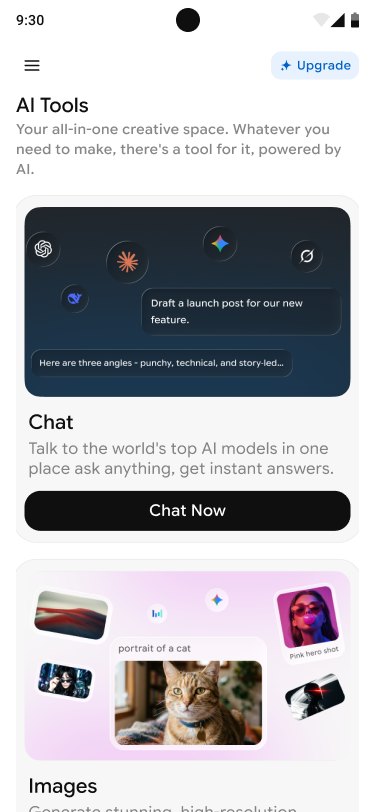
Open AI Tools to see everything Chatly can do. Tap a tool like Chat or Generate Images to get started.
\
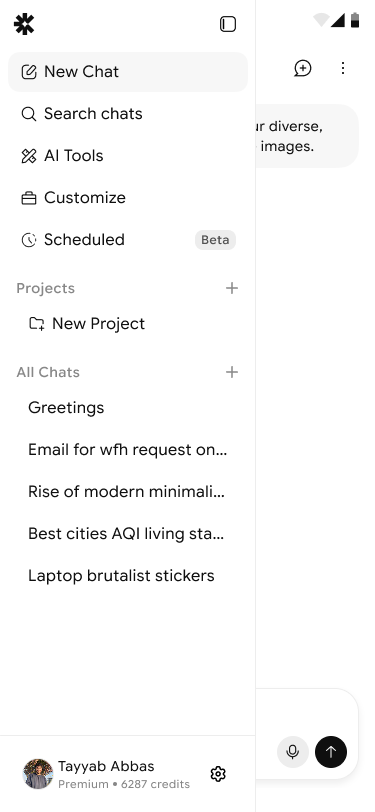
Access your tools, chats, and history, just like on the web app.
On the home screen, you can also choose your mode, Think, Pro, or Ultra, upload a file with the plus button, or use voice input to describe what you want out loud.
#### Download the app:
[iOS, App Store](https://apps.apple.com/pk/app/chatly-ai-ai-smart-assistant/id6743070011)\
[Android, Google Play](https://play.google.com/store/apps/details?id=com.vyro.chatly)
#### Get Chatly on Mac or Windows:
**Mac**
Download the Chatly app from the App Store: [Chatly AI - AI Smart Assistance](https://apps.apple.com/pk/app/chatly-ai-ai-smart-assistant/id6743070011)
**Windows**
1. Open [chatlyai.app ](https://chatlyai.app)in Google Chrome.
2. Click three dots in the top-right corner of the browser.
3. Select Cast, save and share.
4. Select Install Page as App.